A To Do List Table Template is an invaluable tool for teachers looking to streamline their task management and enhance classroom organization. This resource allows you to break down tasks, assign responsibilities, and track progress in a visually clear and structured format. By utilizing this template, you can delegate tasks more effectively within your team or among students, ensuring that everyone knows their responsibilities and deadlines.
Understanding the To Do List Table Template
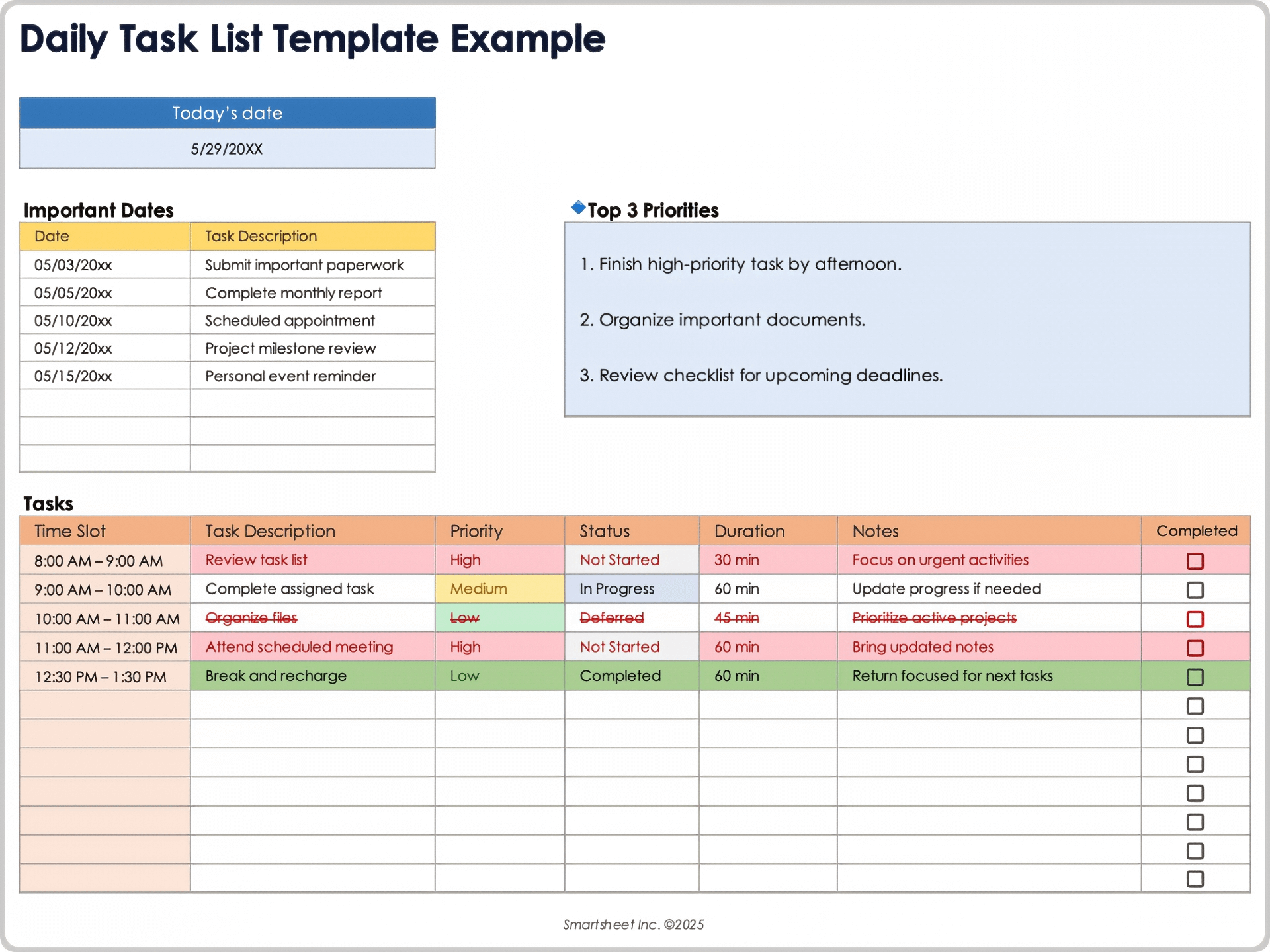
At its core, a To Do List Table Template provides a simple and intuitive way to list tasks along with key details such as deadlines, assigned individuals, and status updates. This format is especially useful in educational settings where collaboration is key. You can create a table with columns for task descriptions, due dates, responsible parties, and completion status.
For example, a typical layout might include:
- Task Description
- Due Date
- Assigned To
- Status (Not Started, In Progress, Completed)
This structure not only helps you keep track of what needs to be done but also allows you to visualize the workload across your team or class. By checking off completed tasks, you can maintain motivation and accountability.
How to Use the To Do List Table Template Effectively
To maximize the effectiveness of your To Do List Table Template, follow these practical steps:
Step 1: Define Your Tasks
Start by brainstorming all the tasks that need to be accomplished. This could include lesson planning, grading assignments, preparing materials for upcoming projects, or coordinating events. Be as specific as possible to avoid ambiguity.
Step 2: Assign Responsibilities
Once you have a comprehensive list of tasks, it’s time to delegate. Assign each task to a specific individual or group. This ensures that everyone knows their role and contributes to the overall goals of the class or project. For instance, you might assign a student to prepare a presentation while another is tasked with creating visual aids.
Step 3: Set Deadlines
Incorporate deadlines for each task. This creates a sense of urgency and helps everyone stay on track. Make sure these deadlines are realistic and consider the workload of each person involved. Clearly indicate these dates in your table so they are easily visible.
Step 4: Monitor Progress
Regularly update the status of each task. This is crucial for maintaining accountability and ensuring that no tasks fall through the cracks. Hold brief check-in meetings to discuss progress and address any challenges that may arise.
Step 5: Review and Revise
At the end of each week or project, review the completed tasks and assess what worked well and what didn’t. Use this feedback to refine your approach for future tasks. You may also want to adapt the template itself based on your experiences.
Benefits of Using a To Do List Table Template in Education
Using a To Do List Table Template offers several advantages for teachers and students alike:
- Clarity: A structured format helps clarify responsibilities and deadlines, reducing confusion.
- Accountability: Assigning tasks keeps everyone accountable, promoting teamwork and collaboration.
- Motivation: Checking off completed tasks provides a sense of accomplishment and encourages continued progress.
- Flexibility: Templates can be easily modified to suit different projects, grade levels, or classroom needs.
For instance, if you’re overseeing a group project, the template can help keep all students engaged and informed about their contributions.
Choosing the Right Format for Your To Do List Table Template
When selecting a format for your To Do List Table Template, consider how you plan to use it. Here are a few options:
- Digital Format: Using software like Google Sheets or Microsoft Excel allows for easy sharing and real-time updates. This is ideal for collaborative projects where multiple individuals need access.
- Printable Format: A printable version is perfect for classrooms where technology may not be accessible to all students. You can print copies and post them in a common area for visibility.
- Customizable Templates: Many online resources offer customizable templates that allow you to tailor the layout to your needs. Look for options that let you easily change headings, colors, and styles.
Practical Tips for Implementing the To Do List Table Template
To ensure that your To Do List Table Template is effective, consider these practical tips:
- Keep It Simple: Don’t overcomplicate the template. A clear and concise layout is more likely to be used and understood by everyone involved.
- Use Color Coding: Implement color coding for different types of tasks or priorities. This visual cue can help quickly identify what needs immediate attention.
- Involve Students: If applicable, encourage students to contribute to the template by adding their own tasks or adjusting their responsibilities. This promotes ownership and responsibility.
- Regular Updates: Make it a habit to review and update the template regularly. This keeps it relevant and useful for all team members.
By following these tips, you can create a To Do List Table Template that not only organizes tasks but also enhances collaboration and productivity in your classroom or educational environment.
The To Do List Table Template is not just a tool for tracking tasks; it’s a powerful resource for fostering teamwork, accountability, and effective communication among educators and students alike. If you are managing a classroom project or coordinating with colleagues, this template will help you stay organized and on task.









